
Volvo XC90: Maintenance and service / Polishing and waxing
Polish and wax the vehicle when the paint is dull or to provide extra protection. The vehicle does not need to be polished until it is at least a year old. However, it can be waxed during the first year. Do not polish or wax the vehicle in direct sunlight. The surface of the vehicle should not be warmer than 45 °C (113 °F).
- Wash and dry the vehicle very carefully before polishing or waxing. Remove asphalt and tar stains with asphalt remover or paint thinner. More stubborn stains can be removed with a grinding paste designed for vehicle paint. Use cleaning agents recommended by Volvo.
- Use polish first and then liquid or paste wax. Follow the instructions on the package carefully. Many products contain both polish and wax.
- A wide range of polymer-based waxes can be purchased today. These waxes are easy to use and produce a long-lasting, highgloss finish that protects the bodywork against oxidation, road dirt and fading.
CAUTION
Never polish or wax initially matte exterior details on the vehicle. This could destroy the matte effect and make the surface permanently shiny.
CAUTION
Avoid waxing and polishing plastic and rubber.
If using degreaser on plastic and rubber, only rub (if necessary) with slight pressure. Use a soft sponge.
Polishing glossy trim moldings can wear away or damage the glossy surface layer.
Polish containing abrasives must not be used.
CAUTION
Use cleaning agents recommended by Volvo. Other treatments, such as preservation, sealing, protection, luster sealing or similar, could damage the paintwork. Paintwork damage caused by such treatments are not covered by Volvo's warranty.
 Cleaning the exterior
The vehicle should be washed as soon as it becomes dirty. This makes the vehicle
easier to clean because dirt does not attach as strongly. It also reduces the risk
of scratches and keeps the vehicle looking new...
 Hand washing
The vehicle should be washed as soon as it becomes dirty. This makes the vehicle
easier to clean because dirt does not attach as strongly. It also reduces the risk
of scratches and keeps the vehicle looking new...
Other information:
Volvo XC90 2015-2026 Owners Manual: Roof loads and load carriers
Volvo-developed load carriers are recommended for carrying loads on the roof of the vehicle. Volvo load carriers are specially designed to help prevent damage to your vehicle and help ensure maximum safety while driving. Volvo load carriers are available from authorized Volvo retailers...
Volvo XC90 2015-2026 Owners Manual: Deleting Wi-Fi networks
Networks that are not needed can be deleted. Tap Settings in the Top view. Proceed to Communication Wi-Fi Saved networks. Tap Forget to delete the network. Confirm the selection. The vehicle will no longer connect to the deleted network. Deleting all networks All networks can be deleted at once by performing a factory reset...
- Manuals Home
- 2nd Generation XC90 Owners Manual
- 2nd Generation XC90 Service Manual
- Active high beam
- Adjusting front seat massage settings
- Drive modes
- New on site
- Most important about car
Categories
Door and seat belt reminders
This system is intended to remind occupants to buckle their seat belts and to alert the driver if a door, hood or other opening (trunk, sunroof, etc.) is open.
Graphics in the instrument panel
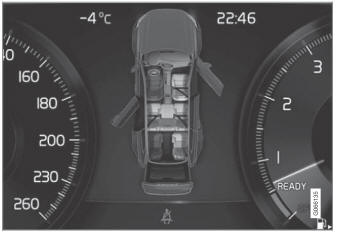
Graphics in the instrument panel with various types of warnings. The warning colors for the doors/tailgate vary depending on the vehicle's speed.
