
Volvo XC90 2015-2026 Owners Manual / Driver support / Rear Collision Warning limitations
Volvo XC90: Driver support / Rear Collision Warning limitations
(Option/accessory.)
(Warning of collision from the rear.)
In some situations, it may be difficult for Rear Collision Warning (RCW) to warn the driver of a collision risk.
This may be the case if:
- the vehicle approaching from the rear is detected at a late stage
- the vehicle approaching from the rear changes lanes at a late stage
- a trailer, bicycle holder or similar is connected to the vehicle's electrical system - the function will then be automatically deactivated.
NOTE
In certain markets RCW does not warn with the direction indicators due to local traffic regulations – in such cases, that part of the function is deactivated.
NOTE
The function uses the vehicle's camera and radar sensor, which has certain general limitations.
 Rear Collision Warning
(Option/accessory.)
(Warning of collision from the rear.)
The Rear Collision Warning1 (RCW) function can help the driver
avoid rear-end collisions from vehicles approaching from behind...
 BLIS
BLIS
(Option/accessory.)
The BLIS1 function is designed to help provide assistance in heavy
traffic with several lanes moving in the same direction by helping the driver to
detect the presence of vehicles in the "blind spot" area behind and to the side
of the vehicle...
Other information:
Volvo XC90 2015-2026 Owners Manual: Trip statistics settings
Trip statistics settings can be reset or adjusted. Open the Driver performance app in the App view to display trip statistics. Tap Preferences to change the graph scale. Select 1, 10 or 100 km/miles for the bar. reset data after each trip. Performed when the vehicle remains stationary for more than 4 hours...
Volvo XC90 2015-2026 Owners Manual: HD Radio™
HD Radio is a brand name registered by the DTS, Inc.1. They are the developer of a broadcasting technology called IBOC or In Band On Channel, which refers to the method of transmitting a digital radio broadcast signal centered on the same frequency as the AM or FM station's present frequency...
- Manuals Home
- 2nd Generation XC90 Owners Manual
- 2nd Generation XC90 Service Manual
- Eco drive mode
- Connecting the vehicle to the Internet via vehicle modem (SIM card)
- Leveling control settings
- New on site
- Most important about car
Categories
Driver/passenger side front airbags
As a supplement to the seat belts, the vehicle is equipped with driver and passenger side front airbags.
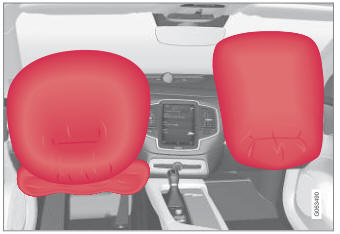
Driver/passenger side front airbags.

Copyright © 2026 www.voxc90.com