
Volvo XC90 2015-2026 Owners Manual / Climate control / Activating and deactivating autostart of third-row climate control
Volvo XC90: Climate control / Activating and deactivating autostart of third-row climate control
(Option/accessory.)
The air conditioning cools and dehumidifies incoming air as needed.
On models with a 4-zone climate*, the air conditioning for the third row of seats can be set to start automatically when the engine is started.
- Tap Settings in the Top view in the center display.
- Tap Climate.
- Select Auto Third Row Climate to activate/ deactivate the air conditioning for the third row of seats when the engine is started.
* Option/accessory.
 Activating and deactivating climate control for the third-row seats
(Option/accessory.)
The third row of seats has separate air conditioning that cools and dehumidifies
incoming air as needed.
Tap the symbol in the center
of the climate bar to open Climate view in the center display...
 Parking climate
(Option/accessory.)
Parking climate is an umbrella term for various functions that improve the
passenger compartment climate when the vehicle is parked, e...
Other information:
Volvo XC90 2015-2026 Owners Manual: Activating and deactivating the compass. Calibrating the compass
Activating and deactivating An integrated compass1 in the upper right corner of the rearview mirror shows the direction the vehicle is traveling. The compass is automatically activated when the vehicle is started. To deactivate/activate the compass manually: Use a paper clip or similar object to press the button on the bottom of the mirror...
Volvo XC90 2015-2026 Owners Manual: Activating or deactivating Park Assist
(Option/accessory.) The Park Assist function (PAS1) can be activated or deactivated. Park Assist's front and side sensors are automatically activated when the engine is started. The rear sensors are activated if the vehicle is moving backward or reverse gear is engaged...
- Manuals Home
- 2nd Generation XC90 Owners Manual
- 2nd Generation XC90 Service Manual
- Moving the second row seats forward/rearward
- Folding the second row backrests
- Filling washer fluid
- New on site
- Most important about car
Categories
Leveling control settings
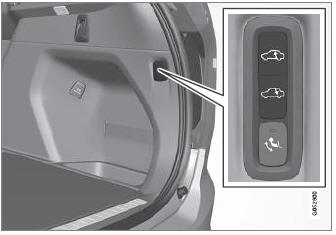
(Option/accessory.)
Turn off leveling control before lifting the vehicle with a jack to help avoid problems with the pneumatic suspension.
The vehicle can be lowered or raised to make it easier to load or for passengers to get in and out.
Adjusting loading mode

Copyright © 2026 www.voxc90.com