
Volvo XC90: Driver support / Temporarily deactivating steering assistance with Pilot Assist
(Option/accessory.)
(Depending on market, this function can be either standard or optional.)
Pilot Assist steering assistance can be temporarily deactivated and reactivated without prior warning.
When the turn signals are used, Pilot Assist's steering assistance will be temporarily deactivated. When the direction indicator is turned off, steering assistance is reactivated automatically if the lane's edge markings can still be detected.
If Pilot Assist cannot clearly interpret the lane's side marker lines or if the camera/radar sensor is unable for some other reason to clearly interpret the lane, Pilot Assist will temporarily deactivate steering assistance. However, the speed and distance warnings will remain active. Steering assistance will resume when the side marker lines can once again be interpreted. In these situations, the driver may be alerted through slight vibrations in the steering wheel that steering assistance is temporarily deactivated.
 Pilot Assist * standby mode
(Option/accessory.)
(Depending on market, this function can be either standard or optional.)
Pilot Assist can be deactivated and put in standby mode. This may happen automatically
or be due to driver intervention...
 Pilot Assist limitations
(Option/accessory.)
(Depending on market, this function can be either standard or optional.)
Pilot Assist functionality may be reduced in certain situations...
Other information:
Volvo XC90 2015-2026 Owners Manual: Activating or deactivating steering assistance during collision risks
The steering assistance function is optional – the driver can choose to have it activated or deactivated. Activate or deactivate the function using this button in the center display's Function view. GREEN button indicator light – the function is activated...
Volvo XC90 2015-2026 Owners Manual: Setting a warning distance for City Safety
City Safety1 is always active, but the function's warning distance can be adjusted. NOTE The City Safety function cannot be deactivated. It is activated automatically each time the engine/electric motor is started. The alert distance determines the sensitivity of the system and regulates the distance at which the light, sound and brake pulsations will be activated...
- Manuals Home
- 2nd Generation XC90 Owners Manual
- 2nd Generation XC90 Service Manual
- Moving the second row seats forward/rearward
- Connecting a device via the USB port
- Video
- New on site
- Most important about car
Categories
Driver/passenger side front airbags
As a supplement to the seat belts, the vehicle is equipped with driver and passenger side front airbags.
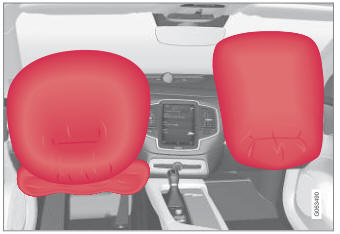
Driver/passenger side front airbags.
