
Volvo XC90: Key, locks and alarm / Arming and disarming the alarm
The alarm is armed when the vehicle is locked and disarmed when the vehicle is unlocked. The alarm can also be disarmed without a functioning key.
Arming and disarming the alarm
The alarm is armed when the vehicle is locked and disarmed when the vehicle is unlocked.
Disarming the alarm without a functioning remote key
The vehicle can be unlocked and disarmed even if the remote key is not functioning e.g. if the battery is discharged.
- Open the driver's door using the detachable key blade.
- This will trigger the alarm.
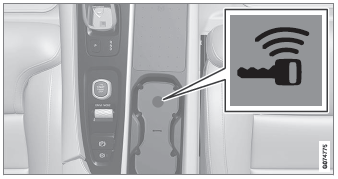
Location of the backup key reader in the cup holder.
- Place the remote key on the key symbol in the backup reader in the tunnel console's cup holder.
- Turn the start knob clockwise and release.
- The alarm will be disarmed.
Turning off a triggered alarm
- Press the unlock button on the remote key or put the ignition into mode I by turning the start knob clockwise and then releasing it.
 Alarm
Alarm
The alarm emits sound and light signals if anyone without a valid remote key
attempts to break into the vehicle or interferes with the start battery or alarm
siren...
 Driver support
Driver support systems
The vehicle is equipped with a number of driver support systems that can provide the driver with active or passive assistance in various situations...
Other information:
Volvo XC90 2015-2026 Owners Manual: Hill Descent Control
(Option/accessory.) The function for assisting when driving downhill (HDC1) is a low-speed function with increased engine braking. The function makes it possible to increase or decrease the vehicle's speed on steep downhill gradients by only using the accelerator pedal, without applying the brakes...
Volvo XC90 2015-2026 Owners Manual: Adjusting the rearview mirror dimming function
Bright light entering the vehicle from behind, e.g. from the headlights of following vehicles, could reflect in the rearview mirror and door mirrors and cause a glare. Use the dimming function when light from behind is distracting. Auto-dim If bright light enters the vehicle from behind, the door mirrors will automatically dim when it is dark outside or when lighting conditions are low, for exa..
- Manuals Home
- 2nd Generation XC90 Owners Manual
- 2nd Generation XC90 Service Manual
- Front fog lights/corner illumination
- Adjusting front seat massage settings
- Connecting a device via the USB port
- New on site
- Most important about car
Categories
Distance Alert
(Option/accessory.)
The Distance Alert function can help the driver become aware if the time interval to the vehicle in front is too short. The vehicle must be equipped with a head-up display* in order to display Distance Alert.
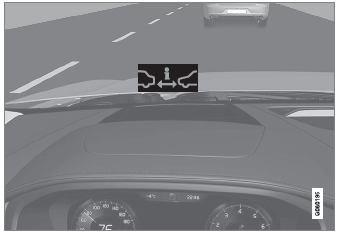
Symbol for Distance Alert on the windshield with head-up display
