Volvo XC90: Climate control / Activating and deactivating front seat ventilation
(Option/accessory)
The seats can be ventilated to provide increased comfort in warm weather. The ventilation system consists of fans in the seats and backrest that draw air through the seat upholstery. The cooler the passenger compartment is, the greater the cooling effect of the ventilation. The system can be activated when the engine is running.
 Tap the left- or right-side
steering wheel and seat button in the center display's climate bar to open the
controls for steering wheel and seat heating.
Tap the left- or right-side
steering wheel and seat button in the center display's climate bar to open the
controls for steering wheel and seat heating.If the vehicle is not equipped with heated seats or heated steering wheel (for the driver's side), the button for seat ventilation is directly accessible in the climate bar.
 Tap the seat ventilation button
repeatedly to select one of the four levels: Off, High, Medium
or Low.
Tap the seat ventilation button
repeatedly to select one of the four levels: Off, High, Medium
or Low.- The level is changed and the set level is displayed in the button.
 Activating and deactivating the heated rear seats
(Option/accessory)
The seats can be heated for added comfort for the driver and passengers in
cold weather.
Activating and deactivating the heated rear seats from the front seats*
Tap the symbol in the center
of the climate bar to open Climate view in the center display...
 Activating and deactivating the heated steering wheel
(Option/accessory)
The steering wheel can be heated for added comfort in cold weather.
Tap the driver's side steering
wheel and seat button in the climate bar in the center display to open the controls
for steering wheel and seat heating...
Other information:
Volvo XC90 2015-2026 Owners Manual: Spare wheel
(Not available on all models.) The spare wheel is a Temporary Spare and can be used to temporarily replace a punctured tire on one of the vehicle's regular wheels. The spare wheel is only intended for temporary use. Replace it with a normal wheel as soon as possible...
Volvo XC90 2015-2026 Owners Manual: Deactivating the Start/Stop function
In certain situations, it may be advisable to turn the Start/Stop function off. To turn off Start/Stop, tap the Start/Stop function button in the center display's Function view. The indicator light in the button will go out when the function has been turned off...
- Manuals Home
- 2nd Generation XC90 Owners Manual
- 2nd Generation XC90 Service Manual
- Activating and deactivating child locks
- Eco drive mode
- Leveling control settings
- New on site
- Most important about car
Categories
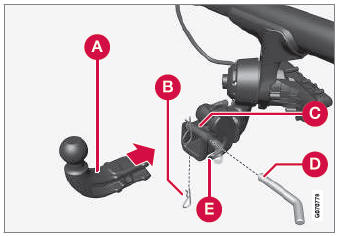
Detachable towbar
(Option/accessory.)
Volvo recommends the use of Volvo towbars that are specially designed for the vehicle.
NOTE
The optional detachable trailer hitch may not be available in all markets or on all models. Consult your Volvo retailer.