
Volvo XC90: Maintenance and service / Changing rear window wipers
The wiper blades help remove water from the windshield and rear window. Along with the washer fluid, they are designed to clean the glass and help improve visibility while driving. The windshield and rear window wiper blades can be replaced.
Changing rear window wipers
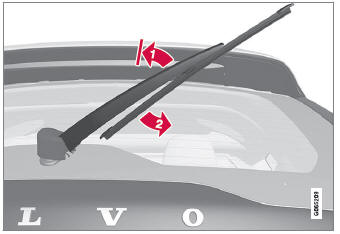
Lift the wiper arm from the window and pull the lower section of the blade to the right.
Grasp the center of the wiper blade and lift it from the window to the stop position.
NOTE
When the wiper arm is halfway folded out, it will stop in a locking position that helps prevent the arm from falling back onto the rear window. The wiper arm must be pulled past the locking position stop in order to change the wiper blade.
Grip the lower part of the blade and pull to the right until the blade loosens from the arm.
- Press the new wiper blade until it clicks into place. Check to make sure the blade is securely in place.
- Fold the wiper arm back toward the window.
CAUTION
Check the blades regularly. Neglected maintenance shortens the life of the blades.
 Color codes
Color code
The color code decal is placed on the vehicle's left-side door pillar (B-pillar)
between the front and rear doors and is visible when the left front door is open...
 Replacing windshield wiper blades
The wiper blades help remove water from the windshield and rear window. Along
with the washer fluid, they are designed to clean the glass and help improve visibility
while driving...
Other information:
Volvo XC90 2015-2026 Owners Manual: Distance Alert
(Option/accessory.) The Distance Alert function can help the driver become aware if the time interval to the vehicle in front is too short. The vehicle must be equipped with a head-up display* in order to display Distance Alert. Symbol for Distance Alert on the windshield with head-up display In vehicles equipped with a head-up display, a symbol will be displayed on the windshield as long as t..
Volvo XC90 2015-2026 Owners Manual: Using Apple® CarPlay®
(Option/accessory.) To use CarPlay1, the Siri voice control must be activated in your iOS device. The device must also have an Internet connection via Wi- Fi or a mobile network for all functions to work. Connecting an iOS device and starting CarPlay NOTE CarPlay can only be used if Bluetooth is disabled. A cell phone or media player connected to the vehicle via Bluetooth will therefore not be ..
- Manuals Home
- 2nd Generation XC90 Owners Manual
- 2nd Generation XC90 Service Manual
- Adjusting front seat massage settings
- Connecting the vehicle to the Internet via vehicle modem (SIM card)
- Using the windshield and head-light washers
- New on site
- Most important about car
Categories
Driver/passenger side front airbags
As a supplement to the seat belts, the vehicle is equipped with driver and passenger side front airbags.
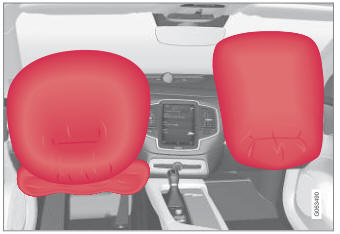
Driver/passenger side front airbags.
