
Volvo XC90: Maintenance and service / Replacing windshield wiper blades
The wiper blades help remove water from the windshield and rear window. Along with the washer fluid, they are designed to clean the glass and help improve visibility while driving. The windshield and rear window wiper blades can be replaced.
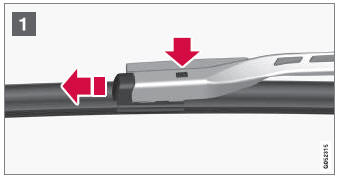
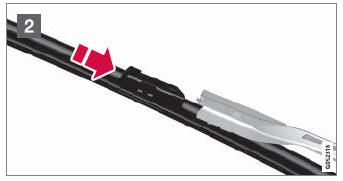
Raise the wiper arms to the service position. Service position is activated/deactivated via the function view in the center display when the car is stationary and the windshield wipers are not on. Press the button on the wiper blade attachment and pull the wiper blade straight out, parallel with the wiper arm.
Slide in a new wiper blade until it clicks into place.
- Check to make sure the blade is securely in place.
- Press the wiper blade back against the windshield.
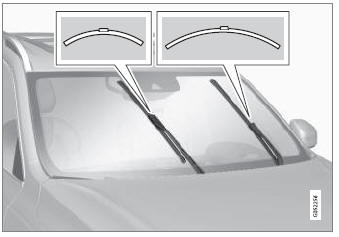
Wiper blades come in varying lengths
NOTE
When changing wiper blades, make sure that the blades are of different lengths. The blade on the driver's side is longer than the one on the passenger side.
 Changing rear window wipers
The wiper blades help remove water from the windshield and rear window. Along
with the washer fluid, they are designed to clean the glass and help improve visibility
while driving...
 Putting the wiper blades in service position
The windshield wiper blades must be in the service (vertical) position for certain
operations, e.g. replacing the blades.
Windshield wipers in the service position...
Other information:
Volvo XC90 2015-2026 Owners Manual: Starting the vehicle
The vehicle can be started using the start knob in the tunnel console when the remote key is in the passenger compartment. Start knob in the tunnel console. WARNING Before starting: Buckle your seat belt. Adjust the seat, steering wheel and mirrors...
Volvo XC90 2015-2026 Owners Manual: Hoisting the vehicle
When hoisting the vehicle, it is important that the jack is positioned on the designated points under the vehicle. The triangles in the plastic covering indicate where the jack attachment points/lifting points (red areas) are located. NOTE For vehicles with Leveling Control*: If the vehicle is equipped with pneumatic suspension, this feature must be turned off before the vehicle is lifted ont..
- Manuals Home
- 2nd Generation XC90 Owners Manual
- 2nd Generation XC90 Service Manual
- Moving the second row seats forward/rearward
- Filling washer fluid
- Arming and disarming the alarm
- New on site
- Most important about car
Categories
Apps
The App view contains apps that provide access to certain vehicle services.
Swipe the center display screen from right to left1 to access the App view from the Home view. This view displays downloaded apps (third-party apps) as well as apps for integrated functions, such as FM radio.
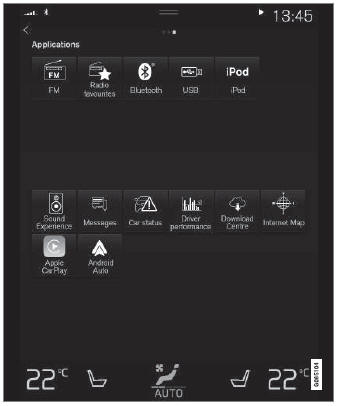
App view. (generic illustration; basic apps vary depending on market and model)
