Volvo XC90: Specifications / Dimensions
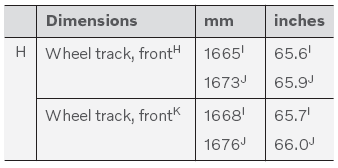
The vehicle's length, height, etc. are shown in the table.

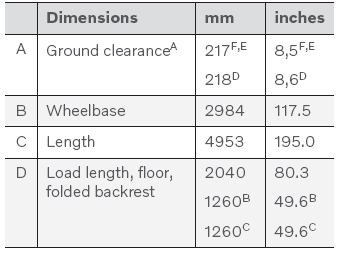
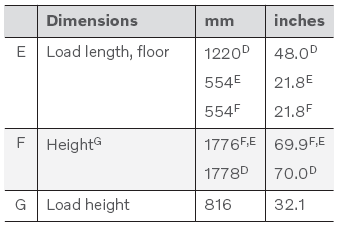
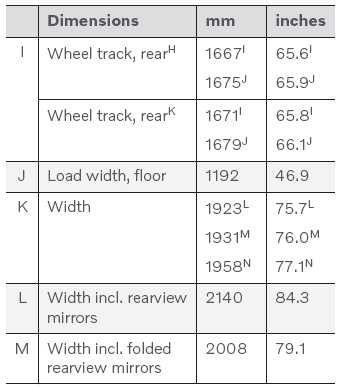
A For curb weight plus 1 person. (Varies slightly depending on tire dimensions, chassis variant, etc.).
B From the second row of seats in 6-seat models*.
C From the second row of seats in 7-seat models*.
D Vehicles with 5 seats.
E Vehicles with 6 seats.
F Vehicles with 7 seats.
G Including roof antenna, at curb weight.
H Vehicles without pneumatic suspension.
I Vehicles with 19-inch wheels.
J Vehicles with 20, 21 and 22-inch wheels.
K Vehicles with pneumatic suspension.
L Chassis width.
M Width for vehicles with 19-inch wheels.
N Width for vehicles with 20, 21 and 22-inch wheels.
* Option/accessory.
 Type designations
The decals in the vehicle contain information such as chassis number, type designation,
color code, etc.
Location of decals
The illustration is general and details may vary depending
on market and model...
 Weights
The following table lists important weight data for your vehicle.
CAUTION
When loading the vehicle, the maximum gross vehicle weight and permissible
axle weights may not be exceeded...
Other information:
Volvo XC90 2015-2026 Owners Manual: Door and seat belt reminders
This system is intended to remind occupants to buckle their seat belts and to alert the driver if a door, hood or other opening (trunk, sunroof, etc.) is open. Graphics in the instrument panel Graphics in the instrument panel with various types of warnings...
Volvo XC90 2015-2026 Owners Manual: Sharing Internet from the vehicle via Wi-Fi hotspot (tethering)
When the vehicle is connected to the Internet, other devices may share the vehicle's Internet connection1. The network service provider (SIM card) must support Internet sharing (tethering). Tap Settings in the Top view. Tap Communication Vehicle Wi-Fi Hotspot...
- Manuals Home
- 2nd Generation XC90 Owners Manual
- 2nd Generation XC90 Service Manual
- Filling washer fluid
- Moving the second row seats forward/rearward
- Front fog lights/corner illumination
- New on site
- Most important about car
Categories
Detachable towbar
(Option/accessory.)
Volvo recommends the use of Volvo towbars that are specially designed for the vehicle.
NOTE
The optional detachable trailer hitch may not be available in all markets or on all models. Consult your Volvo retailer.