
Volvo XC90: Driver support / Cross Traffic Alert limitations
(* Option/accessory.)
(Warning for crossing traffic when the vehicle is backing up.)
The Cross Traffic Alert (CTA) function with auto brake may have limited functionality in certain situations. Auto-brake is active at speeds under 15 km/h (9.3 mph).
WARNING
The auto-brake sub-function can only detect and apply the brakes for other moving vehicles – not for e.g. stationary obstacles, cyclists or pedestrians.
The function has certain limitations – the sensors, for example, cannot "see" through other parked vehicles or objects blocking the vehicle.
Below are a few examples of situations in which the function's field of vision may be initially limited and approaching vehicles may therefore not be detected until they are very close to your vehicle:
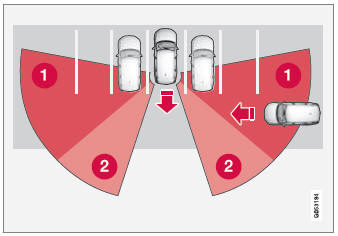
The vehicle is parked very far into a parking space.
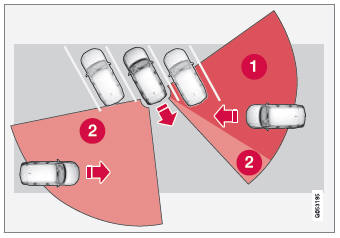
In a diagonal parking space, Cross Traffic Alert may be completely "blind" on one side of your vehicle.
 Blind zone.
 The function's field of vision.
However, as you back your vehicle slowly out of a parking space, CTA's field of vision changes in relation to the obstructing vehicle/object and its blind zone is reduced.
Examples of further limitations
- The auto brake subfunction only detects vehicles in motion and may therefore not "see" and brake for e.g. stationary obstacles, a cyclists or a pedestrian.
- Dirt, ice and snow covering the sensors may reduce functionality and prevent the system from providing warnings.
- CTA is automatically deactivated if a trailer, bicycle holder or similar is connected to the vehicle's electrical system.
- For CTA to function effectively, bicycle holders, luggage racks or similar should not be mounted on the vehicle's towbar.
NOTE
The function uses the vehicle's radar sensors, which have certain general limitations.
 Activating or deactivating Cross Traffic Alert
(* Option/accessory.)
(Warning for crossing traffic when the vehicle is backing up.)
The driver can choose to deactivate the Cross Traffic Alert (CTA) function...
 Cross Traffic Alert messages
(Option/accessory.)
(100Warning for crossing traffic when the vehicle is backing up.)
A number of messages related to Cross Traffic Alert (CTA) may be displayed
in the instrument panel...
Other information:
Volvo XC90 2015-2026 Owners Manual: Roof loads and load carriers
Volvo-developed load carriers are recommended for carrying loads on the roof of the vehicle. Volvo load carriers are specially designed to help prevent damage to your vehicle and help ensure maximum safety while driving. Volvo load carriers are available from authorized Volvo retailers...
Volvo XC90 2015-2026 Owners Manual: Recovery
This section refers to transporting the vehicle with a tow truck or similar vehicle. Call a professional towing service for assistance. In certain conditions, the towing eyelet can be used to pull the vehicle onto a flatbed tow truck. For vehicles equipped with leveling control *: If the vehicle is equipped with pneumatic suspension, this feature must be turned off before the vehicle is lifted..
- Manuals Home
- 2nd Generation XC90 Owners Manual
- 2nd Generation XC90 Service Manual
- Active high beam
- Jump starting using another battery
- Connecting the vehicle to the Internet via vehicle modem (SIM card)
- New on site
- Most important about car
Categories
Location and field of vision of Park Assist Cameras
The Park Assist Cameras (PAC1) can display a 360° panoramic view as well as separate views for each of the four cameras: rear, front, left and right.
360° view*
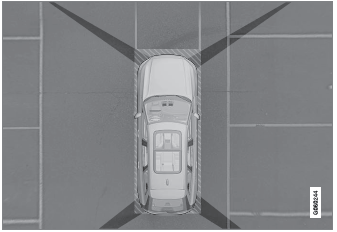
The location of the cameras and their approximate fields of vision.
