
Volvo XC90 2015-2026 Owners Manual / Driver support / Distance Alert limitations
Volvo XC90: Driver support / Distance Alert limitations
Distance Alert functionality may be reduced in certain situations. The function is only available in vehicles that can display information on the windshield with a head-up display *.
WARNING
- Detection ability may be affected by vehicle size, e.g. motorcycles, which can cause the warning light to come on at a shorter time interval than that set or cause the warning to be temporarily absent.
- Very high speeds can cause the light to come on at a shorter time interval than that set due to limitations in the range of the radar unit.
NOTE
The function uses the vehicle's camera and radar sensor, which has certain general limitations.
* Option/accessory.
 Activating or deactivating Distance Alert
Distance Alert can be turned off. The function is only available in vehicles
that can display information on the windshield with a head-up display*.
Activate or deactivate the function
using this button in the center display's Function view...
 Cross Traffic Alert
(Option/accessory.)
Cross Traffic Alert(CTA) is a supplementary driver support system to BLIS1
that is intended to help the driver detect vehicles crossing behind the vehicle
while backing up...
Other information:
Volvo XC90 2015-2026 Owners Manual: Remote key range
In order to function correctly, the remote key must be within a certain distance from the vehicle. Manual use The remote key's functions for e.g. locking and unlocking, which are activated by pressing or , have a range of approx. 20 meters (65 feet) from the vehicle...
Volvo XC90 2015-2026 Owners Manual: Front fog lights/corner illumination
(Option/accessory) The fog lights can be activated manually when driving in fog and are activated automatically when backing up to help augment the backup light. If the vehicle is equipped with corner illumination *, the fog lights are activated automatically in weak daylight or dark conditions to illuminate the area diagonally in front of the vehicle...
- Manuals Home
- 2nd Generation XC90 Owners Manual
- 2nd Generation XC90 Service Manual
- Active high beam
- Video
- Activating and deactivating the head-up display
- New on site
- Most important about car
Categories
Driver/passenger side front airbags
As a supplement to the seat belts, the vehicle is equipped with driver and passenger side front airbags.
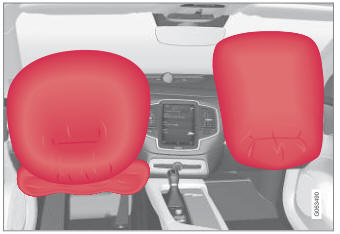
Driver/passenger side front airbags.

Copyright © 2026 www.voxc90.com