Volvo XC90: Creating and registering a Volvo ID / Driver distraction
A driver has a responsibility to do everything possible to ensure his or her own safety and the safety of passengers in the vehicle and others sharing the roadway. Part of this responsibility is avoiding distractions, including performing activities that are not directly related to controlling the vehicle in the driving environment.
Your new Volvo is, or can be, equipped with feature-rich entertainment and communication systems. These include hands-free cellular telephones, navigation systems, and multipurpose audio systems. You may also own other portable electronic devices for your own convenience. When used properly and safely, they enrich the driving experience. Improperly used, any of these could cause a distraction.
For all of these systems, we want to provide the following warning that reflects the strong Volvo concern for your safety. Never use these devices or any feature of your vehicle in a way that distracts you from the task of driving safely. Distraction can lead to a serious accident. In addition to this general warning, we offer the following guidance regarding specific new features that may be found in your vehicle:
WARNING
Never use a hand-held cellular telephone while driving. Some jurisdictions prohibit cellular telephone use by a driver while the vehicle is moving.
If your vehicle is equipped with a navigation system, set and make changes to your travel itinerary only with the vehicle parked.
Never program your audio system while the vehicle is moving. Program radio presets with the vehicle parked, and use your programmed presets to make radio use quicker and simpler.
Never use portable computers or personal digital assistants while the vehicle is moving.
 Change of market when importing or relocating
If you import a vehicle or move to another country, it is important that you
register the vehicle in the new market to help ensure that online services work
correctly, that the vehicle meets local laws and regulations, etc...
 Safety
Safety
The vehicle is equipped with a number of safety systems that work together to help protect the vehicle's driver and passengers in the event of an accident...
Other information:
Volvo XC90 2015-2026 Owners Manual: Rear Collision Warning limitations
(Option/accessory.) (Warning of collision from the rear.) In some situations, it may be difficult for Rear Collision Warning (RCW) to warn the driver of a collision risk. This may be the case if: the vehicle approaching from the rear is detected at a late stage the vehicle approaching from the rear changes lanes at a late stage a trailer, bicycle holder or similar is connected to the vehicle'..
Volvo XC90 2015-2026 Owners Manual: Roof loads and load carriers
Volvo-developed load carriers are recommended for carrying loads on the roof of the vehicle. Volvo load carriers are specially designed to help prevent damage to your vehicle and help ensure maximum safety while driving. Volvo load carriers are available from authorized Volvo retailers. Carefully follow the installation instructions provided with the load carriers. Distribute the load evenly ..
- Manuals Home
- 2nd Generation XC90 Owners Manual
- 2nd Generation XC90 Service Manual
- Filling washer fluid
- Video
- Folding the second row backrests
- New on site
- Most important about car
Categories
Leveling control settings
(Option/accessory.)
Turn off leveling control before lifting the vehicle with a jack to help avoid problems with the pneumatic suspension.
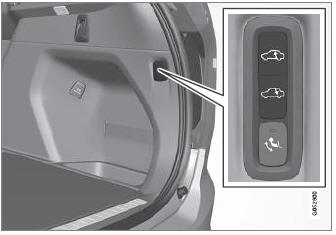
The vehicle can be lowered or raised to make it easier to load or for passengers to get in and out.
Adjusting loading mode