
Volvo XC90: Loading, storage and passenger compartment / Grocery bag holders
Grocery bag holders (hooks) help keep shopping bags in place and prevent them from falling over and spilling their contents in the cargo compartment.
On the sides of the cargo compartment
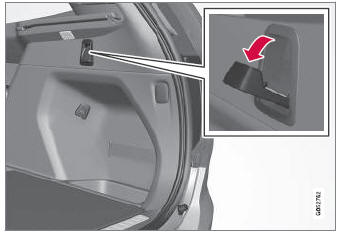
There are two fold-out holders in the side panels, one on each side of the cargo compartment.
CAUTION
The grocery bag holders are only intended to hold weights up to 5 kg (11 lbs).
Under the floor hatch*1
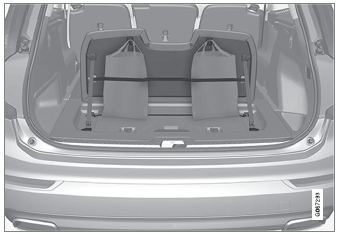
There are two grocery bag holders and an elastic band2 in the hatch in the cargo compartment floor. The strap can be attached in four different positions.
Open the hatch to access the grocery bag holders. Use the provided elastic strap to secure shopping bags in a suitable position. Bags with handles of a suitable size can also be hung on the hooks.
1 5-seat models only.
2 Additional elastic straps can be ordered from a Volvo retailer.
* Option/accessory.
 Roof loads and load carriers
Volvo-developed load carriers are recommended for carrying loads on the roof
of the vehicle.
Volvo load carriers are specially designed to help prevent damage to your vehicle
and help ensure maximum safety while driving...
 Load anchoring eyelets
The load anchoring eyelets in the cargo compartment can be used to secure
objects with straps, a net, etc.
WARNING
Hard, sharp and/or heavy objects in or protruding from the vehicle can
cause injury in the event of hard braking...
Other information:
Volvo XC90 2015-2026 Owners Manual: Interior Air Quality System. Activating and deactivating the air quality sensor
(Option/accessory) Interior Air Quality System (IAQS) is a fully automatic air quality system that removes gases and particles to reduce odors and contaminants in the passenger compartment. IAQS is part of the Clean Zone Interior Package (CZIP) and removes air contaminants such as particles, hydrocarbons, nitric oxides and ground-level ozone...
Volvo XC90 2015-2026 Owners Manual: Connecting the vehicle to the Internet via vehicle modem (SIM card)
It is possible to establish an Internet connection via the vehicle modem and a personal SIM card (P-SIM). Vehicles equipped with Volvo On Call will use the vehicle modem Internet connection for the services. Insert a personal SIM card in the holder...
- Manuals Home
- 2nd Generation XC90 Owners Manual
- 2nd Generation XC90 Service Manual
- Using the windshield and head-light washers
- Front fog lights/corner illumination
- Adjusting front seat massage settings
- New on site
- Most important about car
Categories
Door and seat belt reminders
This system is intended to remind occupants to buckle their seat belts and to alert the driver if a door, hood or other opening (trunk, sunroof, etc.) is open.
Graphics in the instrument panel
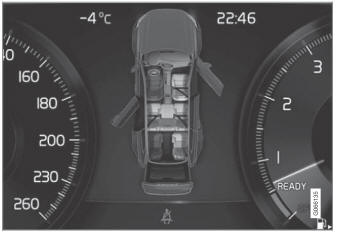
Graphics in the instrument panel with various types of warnings. The warning colors for the doors/tailgate vary depending on the vehicle's speed.
