
Volvo XC90 2015-2026 Owners Manual / Loading, storage and passenger compartment / Roof loads and load carriers
Volvo XC90: Loading, storage and passenger compartment / Roof loads and load carriers
Volvo-developed load carriers are recommended for carrying loads on the roof of the vehicle.
Volvo load carriers are specially designed to help prevent damage to your vehicle and help ensure maximum safety while driving. Volvo load carriers are available from authorized Volvo retailers.
Carefully follow the installation instructions provided with the load carriers.
- Distribute the load evenly throughout the load carriers. Place heavier cargo at the bottom of the load.
- Check periodically to ensure that the load carriers and load are properly secured. Secure the load firmly using tie straps or similar.
- If the load is longer than the vehicle, such as a canoe or kayak, attach the towing eyelet in its front outlet and secure the tie straps in it.
- The vehicle's wind resistance and fuel consumption increase with the size of the load.
- Drive smoothly. Avoid rapid acceleration, hard braking and fast cornering.
WARNING
The vehicle's center of gravity and driving characteristics are altered by roof loads.
Follow the vehicle's specifications regarding weights and maximum permitted load.
* Option/accessory.
 Loading recommendations
There are a number of things that are important to consider when carrying
loads in or on the vehicle.
Load-carrying capacity is determined by the vehicle's curb weight...
 Grocery bag holders
Grocery bag holders (hooks) help keep shopping bags in place and prevent them
from falling over and spilling their contents in the cargo compartment.
On the sides of the cargo compartment
There are two fold-out holders in the side panels, one on each side of the cargo
compartment...
Other information:
Volvo XC90 2015-2026 Owners Manual: The kickdown function
Kickdown can be used when maximum acceleration is needed e.g. when passing. When the accelerator pedal is depressed all the way to the floor (past the normal full accelerator position), the transmission will automatically engage kickdown, i.e. immediately shift down to a lower gear...
Volvo XC90 2015-2026 Owners Manual: City Safety™
City Safety1 can alert the driver with light, sound and pulsations in the brake pedal to help the driver detect pedestrians, cyclists, large animals and vehicles. Function overview Audible signal at risk of collision Collision warning symbol Camera/radar sensor distance monitoring The function can help the driver avoid a collision in e...
- Manuals Home
- 2nd Generation XC90 Owners Manual
- 2nd Generation XC90 Service Manual
- Filling washer fluid
- Eco drive mode
- Arming and disarming the alarm
- New on site
- Most important about car
Categories
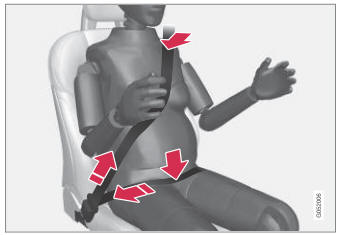
Safety during pregnancy
It is important that seat belts are worn correctly during pregnancy and that pregnant drivers adjust their seating position accordingly.
Seat belt

Copyright © 2026 www.voxc90.com