
Volvo XC90: Lighting / Panoramic roof
(Option/accessory)
The panoramic roof is divided into two glass sections. The front section can be opened vertically at the rear edge (ventilation position) or horizontally (open position). The rear section cannot be moved.
The panoramic roof has a wind deflector and sun curtain made of perforated fabric (located beneath the glass sections) for extra protection in e.g. bright sunlight.
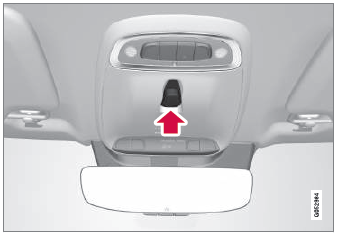
The panoramic roof and sun curtain are operated using the controls in the ceiling.
To operate the panoramic roof and sun curtain, the ignition must be in mode I or II.
WARNING
Children, other passengers or objects can be trapped by the moving parts.
- Always operate the windows with caution.
- Do not allow children to play with the operating controls.
- Never leave a child alone in the vehicle.
- Remember to always cut the current to the power windows by setting the vehicle's electrical system to ignition mode 0 and then taking the key with you when leaving the vehicle.
- Never stick objects or body parts out through the windows, even if the vehicle electrical system is completely turned off.
CAUTION
- Do not open the panoramic roof when load carriers are installed.
- Never place heavy objects on the panoramic roof.
CAUTION
- Remove ice and snow before opening the panoramic roof. Be careful not to scratch any surfaces or damage the trim.
- Do not operate the panoramic roof if it is frozen in place.
Wind blocker
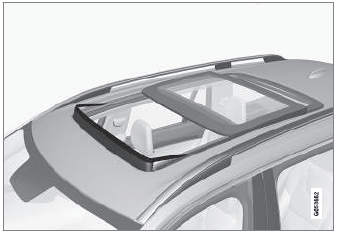
The panoramic roof is equipped with a wind blocker that folds up when the roof is open.
 Adjusting the door mirrors
To improve visibility to the rear, the door mirrors need to be adjusted to
the driver's height and seating position.
There are several automatic settings that can also be connected to the memory
function buttons for the power seat*...
 Operating the panoramic roof
(Option/accessory)
The panoramic roof and sun curtain are operated using a control in the ceiling
panel, and both are equipped with pinch protection.
WARNING
Children, other passengers or objects can be trapped by the moving parts...
Other information:
Volvo XC90 2015-2026 Owners Manual: City Safety steering assistance limitations during evasive maneuvers
City Safety steering assistance may have limited functionality in certain situations and not intervene, e.g.: at speeds outside the range of 50-100 km/h (30-62 mph) if the driver does not take evasive action if speed-dependent power steering wheel resistance is working at reduced power – e...
Volvo XC90 2015-2026 Owners Manual: Towing using a towline
This section refers to one vehicle being towed behind another using a towline. Before towing another vehicle, check applicable speed limit regulations. Preparations and towing CAUTION For some transmission variants, it is not possible to shift from P position if the engine is switched off...
- Manuals Home
- 2nd Generation XC90 Owners Manual
- 2nd Generation XC90 Service Manual
- Connecting a device via the USB port
- Drive modes
- Activating and deactivating child locks
- New on site
- Most important about car
Categories
Apps
The App view contains apps that provide access to certain vehicle services.
Swipe the center display screen from right to left1 to access the App view from the Home view. This view displays downloaded apps (third-party apps) as well as apps for integrated functions, such as FM radio.
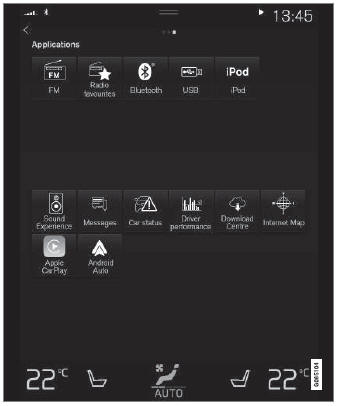
App view. (generic illustration; basic apps vary depending on market and model)
