
Volvo XC90: Lighting / Using high beam
High beam is operated via the left-hand steering wheel lever. High beam is the vehicle's strongest lighting and should be used when driving in dark conditions, provided it does not blind other road users, to improve visibility.
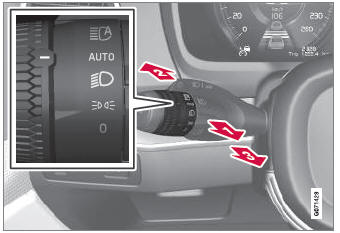
Steering wheel lever with lighting ring.
High beam flash
 Move the steering wheel lever slightly
backward to the high beam flash mode. The high beams will illuminate until the lever
is released.
Move the steering wheel lever slightly
backward to the high beam flash mode. The high beams will illuminate until the lever
is released.
High beams
 The high beams can be activated
when the lighting ring is in mode
The high beams can be activated
when the lighting ring is in mode  1
or
1
or
. Activate high beams by moving the steering wheel lever forward.
 Deactivate by moving the steering
wheel lever backward.
Deactivate by moving the steering
wheel lever backward.
When the high beams are activated, the
 symbol will be illuminated in the instrument
panel.
symbol will be illuminated in the instrument
panel.
1 When the low beams are on.
 Low beams
When driving with the lighting ring in the
position, low beam will be automatically
activated in weak daylight or dark conditions, when the ignition is in the II
position...
 Active high beam
Active high beams is a function that uses camera sensors in the upper edge
of the windshield to detect the headlights of approaching vehicles or the taillights
of the vehicle directly ahead...
Other information:
Volvo XC90 2015-2026 Owners Manual: Handling messages in the center display
Messages in the center display are handled in the center display's views. Example of message in the center display's Top view. Some messages in the center display have a button (or several buttons in a pop-up message) to e.g. activate/deactivate a function related to the message...
Volvo XC90 2015-2026 Owners Manual: Brake lights. Emergency brake lights
The brake lights are automatically illuminated when braking. The brake lights are illuminated when the brake pedal is depressed and when the brakes are automatically applied by a driver support system. Emergency brake lights The emergency brake lights are activated to warn following vehicles of hard braking...
- Manuals Home
- 2nd Generation XC90 Owners Manual
- 2nd Generation XC90 Service Manual
- Jump starting using another battery
- Resetting the trip odometer
- Filling washer fluid
- New on site
- Most important about car
Categories
Driver/passenger side front airbags
As a supplement to the seat belts, the vehicle is equipped with driver and passenger side front airbags.
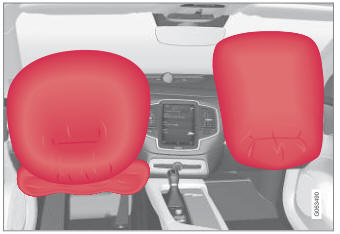
Driver/passenger side front airbags.
