
Volvo XC90 2015-2026 Owners Manual / Climate control / Opening, closing and directing air vents
Volvo XC90: Climate control / Opening, closing and directing air vents
Some of the air vents in the passenger compartment can be individually opened, closed and directed.
Misting can be eliminated by directing the outer air vents towards the door windows.
Direct the outer air vents into the passenger compartment to maintain a comfortable temperature in warm weather.
Opening and closing the air vents
- Turn the thumb wheel under the air vent to open/close the airflow from the
vent.
The more white lines that are visible, the stronger the airflow.
Directing air flow
- Move the lever in the center of the air vent horizontally or vertically to direct the airflow from the vent.
 Adjusting air distribution
Air distribution can be adjusted manually if needed.
Tap the symbol in the center of the climate bar to open Climate view in
the center display.
Air distribution buttons in Climate view...
 Air distribution options
Air distribution can be adjusted manually if needed. The following options
are available.
..
Other information:
Volvo XC90 2015-2026 Owners Manual: SiriusXM Travel Link®
SiriusXM Travel Link is a subscription feature offered by SiriusXM® satellite radio* that can provide information about e.g., weather forecasts, weather alerts, service stations, sports, etc. in the vicinity of the vehicle. Starting SiriusXM Travel Link NOTE SiriusXM Travel Link services are only available in vehicles equipped with the Sensus Navigation system. From the center display's App vi..
Volvo XC90 2015-2026 Owners Manual: Braking on wet roads. Braking on salted roads
Braking on wet roads Prolonged driving in heavy rain without braking may cause braking effect to be slightly delayed the first time the brakes are applied. This may also occur after washing the vehicle. It will then be necessary to apply greater pressure to the brake pedal. You should therefore maintain a greater distance to the vehicle ahead. Firmly apply the brakes after washing the vehicle ..
- Manuals Home
- 2nd Generation XC90 Owners Manual
- 2nd Generation XC90 Service Manual
- Adjusting front seat massage settings
- Eco drive mode
- Resetting the trip odometer
- New on site
- Most important about car
Categories
Driver/passenger side front airbags
As a supplement to the seat belts, the vehicle is equipped with driver and passenger side front airbags.
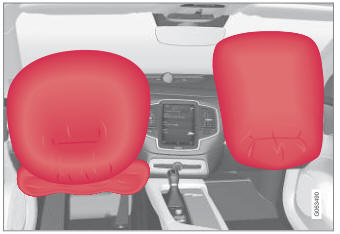
Driver/passenger side front airbags.

Copyright © 2026 www.voxc90.com