
Volvo XC90 2015-2026 Owners Manual / Climate control / Air distribution options
Volvo XC90: Climate control / Air distribution options
Air distribution can be adjusted manually if needed. The following options are available.
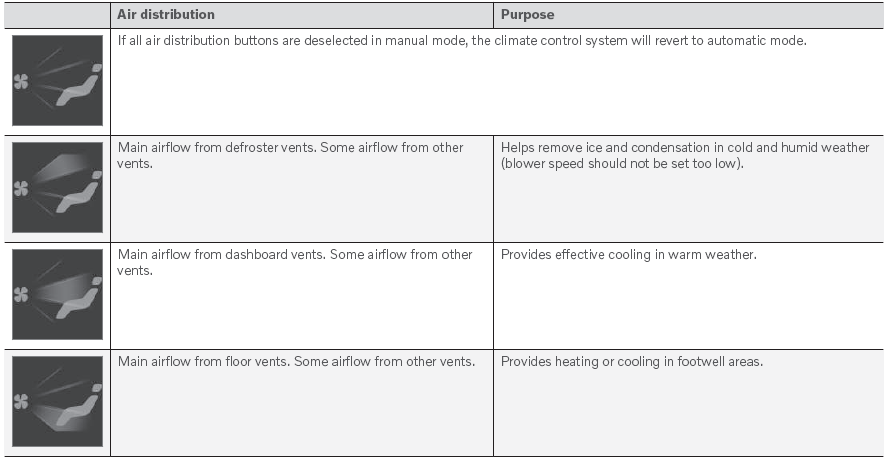
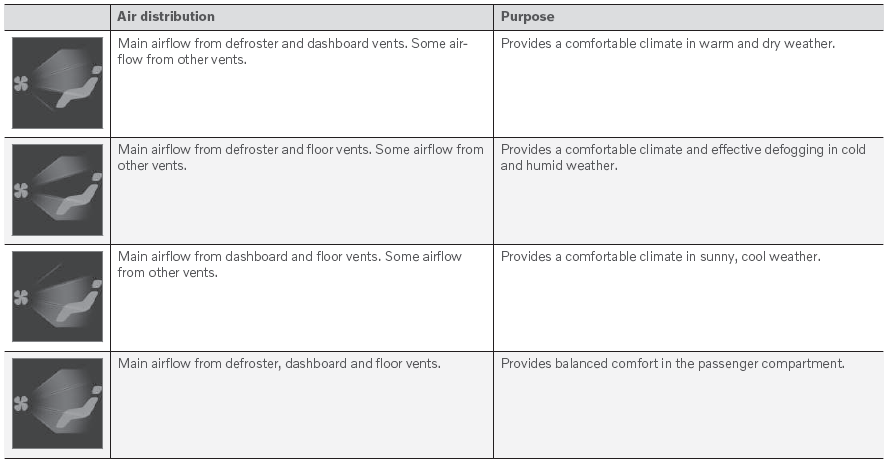
 Opening, closing and directing air vents
Some of the air vents in the passenger compartment can be individually opened,
closed and directed.
Misting can be eliminated by directing the outer air vents towards the door windows...
 Climate system controls
The climate system functions are controlled from physical buttons on the center
console, the center display, and the climate panel on the rear side of the tunnel
console*...
Other information:
Volvo XC90 2015-2026 Owners Manual: City Safety limitations
City Safety1 functionality may be reduced in certain situations. Surroundings Low objects Hanging objects, such as flags for overhanging loads or accessories such as auxiliary lights or front protective grids that extend beyond the height of the hood, may limit City Safety functionality...
Volvo XC90 2015-2026 Owners Manual: Cleaning the center display
Marks, stains, finger smudges etc. on the center display may affect its performance and readability. Clean the screen regularly with a microfiber cloth. Turn off the center display by pressing and holding the Home button. Wipe the screen clean with the microfiber cloth provided or use another microfiber cloth of similar quality...
- Manuals Home
- 2nd Generation XC90 Owners Manual
- 2nd Generation XC90 Service Manual
- Active high beam
- Jump starting using another battery
- Adjusting front seat massage settings
- New on site
- Most important about car
Categories
Apps
The App view contains apps that provide access to certain vehicle services.
Swipe the center display screen from right to left1 to access the App view from the Home view. This view displays downloaded apps (third-party apps) as well as apps for integrated functions, such as FM radio.
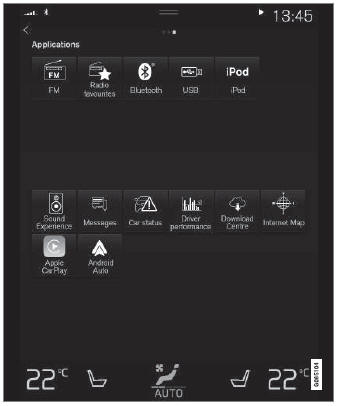
App view. (generic illustration; basic apps vary depending on market and model)

Copyright © 2026 www.voxc90.com