
Volvo XC90 2015-2026 Owners Manual / Climate control / Activating and deactivating recirculation
Volvo XC90: Climate control / Activating and deactivating recirculation
The climate system's recirculation function helps shut out smog, smoke, exhaust fumes, etc. by reusing the air in the passenger compartment.
 Tap the symbol in the center
of the climate bar to open Climate view in the center display.
Tap the symbol in the center
of the climate bar to open Climate view in the center display. Tap Recirc.
- Air recirculation is activated/deactivated and the button lights up/goes out.
CAUTION
If the air in the vehicle is recirculated too long, there is a risk of fogging on the inside of the windows.
NOTE
Recirculation cannot be activated when the max defroster is on.
 Activating auto climate control
If auto climate control is activated, several climate system functions are
controlled automatically.
Tap the symbol in the center of the climate bar to open Climate view in
the center display...
 Activating and deactivating the recirculation timer setting
The climate system's recirculation function helps shut out smog, smoke, exhaust
fumes, etc. by reusing the air in the passenger compartment.
When the recirculation timer is activated, air recirculation will switch off
automatically after 20 minutes...
Other information:
Volvo XC90 2015-2026 Owners Manual: Trailer Stability Assist
(Option/accessory.) Trailer Stability Assist (TSA1) is part of the ESC2 stability system and is a function designed to help stabilize a vehicle that is towing a trailer when the vehicle and trailer have begun to sway. The function is added when installing a towbar...
Volvo XC90 2015-2026 Owners Manual: Synchronize temperature
The temperature in the different climate zones of the vehicle can be synchronized with the temperature set for the driver's side. Synchronization button on the driver's side temperature control. Tap the driver's side temperature button in the center display's climate bar to open the control...
- Manuals Home
- 2nd Generation XC90 Owners Manual
- 2nd Generation XC90 Service Manual
- Moving the second row seats forward/rearward
- Checking and filling engine oil
- Jump starting using another battery
- New on site
- Most important about car
Categories
Driver/passenger side front airbags
As a supplement to the seat belts, the vehicle is equipped with driver and passenger side front airbags.
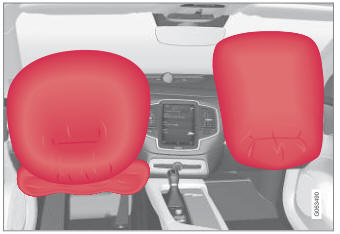
Driver/passenger side front airbags.

Copyright © 2026 www.voxc90.com