Volvo XC90: Starting and driving / Auto-hold brakes
With the Auto-hold brake function, the driver can release the brake pedal and the brakes will remain applied, for example, when the vehicle has stopped at a traffic light or intersection.
When the vehicle stops, the brakes are activated automatically. The function can use either the normal brakes or the parking brakes to keep the vehicle stationary and works on flat surfaces or hills. If the driver has their seat belt fastened and/or if the driver's door is closed, the brakes will disengage automatically when the vehicle starts driving.
NOTE
When braking to a stop on an uphill or downhill gradient, depress the brake pedal with slightly more force than usual before releasing to ensure that the vehicle cannot move at all.
The parking brake is activated if
- the vehicle is switched off.
- the driver's door is opened
- the driver's seat belt is removed
- the vehicle has been stationary for a prolonged period of time (5-10 minutes)
Symbols in the instrument panel
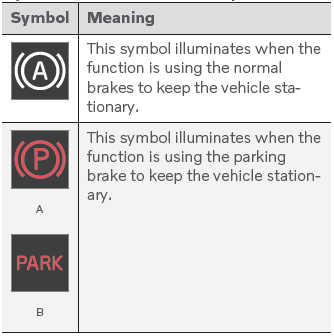
A Canadian models.
B US models.
 Parking brake malfunction
If you are unable to deactivate or activate the parking brake after several attempts,
contact an authorized Volvo workshop. A audible warning signal will sound if the
parking brake is activated while the vehicle is being driven...
 Activating and deactivating Autohold at a standstill
The Auto-hold brake function at a standstill is activated with the button
in the tunnel console.
Press the button in the tunnel console to activate or deactivate the function...
Other information:
Volvo XC90 2015-2026 Owners Manual: Park Assist Pilot limitations
(Option/accessory. Park Assist Pilot (PAP1) may not be able to detect all conditions in all situations and functionality may therefore be limited. The driver should be aware of the following limitations for Park Assist Pilot. WARNING The parking sensors have dead/blind spots where objects cannot be detected...
Volvo XC90 2015-2026 Owners Manual: Adjusting tire pressure
Tire pressure decreases over time, which is normal. The tire pressure must therefore be adjusted to maintain the recommended tire pressure. Use the recommended inflation pressure for cold tires to help maintain good tire performance and even wear. NOTE To help prevent incorrect inflation pressure, pressure should be checked when the tires are cold...
- Manuals Home
- 2nd Generation XC90 Owners Manual
- 2nd Generation XC90 Service Manual
- Arming and disarming the alarm
- Active high beam
- Activating and deactivating child locks
- New on site
- Most important about car
Categories
Leveling control settings
(Option/accessory.)
Turn off leveling control before lifting the vehicle with a jack to help avoid problems with the pneumatic suspension.
The vehicle can be lowered or raised to make it easier to load or for passengers to get in and out.
Adjusting loading mode