
Volvo XC90: Driver support / Auto-hold braking with driver support
The driver support functions Adaptive Cruise Control* and Pilot Assist* have a special brake function in slow traffic and while stationary. In certain situations, the parking brake will be applied to keep the vehicle at a standstill.
Braking function in slow traffic and at a standstill
In slow-moving, stop-and-go traffic or when stopped at a traffic light, driving will resume automatically if the vehicle is stopped for less than approx. 3 seconds. If it takes more than 3 seconds for the vehicle ahead to begin moving again, the driver support function will go into standby mode and the auto-hold brake function will activate.
- The function can be reactivated by:
- Pressing the
 button on
the steering wheel keypad.
button on
the steering wheel keypad. - Pressing the accelerator pedal.
- The function will resume following the vehicle ahead if it begins to move within approx. 6 seconds.
- Pressing the
WARNING
A noticeable increase in speed may follow when the speed is resumed with
the  steering wheel button.
WARNING
The driver support system only issues a warning for obstacles detected by its radar sensor – thus, a warning may come after a delay or not at all.
- Never wait for a warning or assistance. Apply the brakes when necessary.
NOTE
Driver support can keep the vehicle stationary for no more than 5 minutes – after that time the parking brake is applied and the function is deactivated.
The parking brake must be released before driver support can be reactivated.
Deactivation of the Auto-hold brake function
In certain situations, auto-hold will be deactivated when the vehicle is at a standstill and the function will go into standby mode. This means that the brakes will be released and the vehicle could begin to roll. The driver must actively apply the brakes to keep the vehicle stationary.
This can occur if:
- The driver depresses the brake pedal.
- The parking brake is applied.
- The gear selector is moved to the P, N or R position.
- The driver puts Adaptive Cruise Control or Pilot Assist in standby mode.
Auto Activate Parking Brake
The parking brake will be applied if the function is keeping the vehicle stationary using the brakes and:
- The driver opens the door or unbuckles his/her seat belt.
- The function has kept the vehicle at a standstill for more than approx. 5 minutes.
- The brakes overheat.
- The driver switches off the engine.
* Option/accessory.
 Drive modes when using time interval to vehicle
The driver can choose different drive modes to determine how driver support
should maintain a time interval to the vehicle ahead.
Settings are made using the DRIVE MODE controls...
 Lane Keeping Aid
Lane Keeping Aid (LKA1) is designed to actively steer the vehicle
on freeways, highways and other major roads to help the driver reduce the risk of
the vehicle unintentionally veering out of the lane...
Other information:
Volvo XC90 2015-2026 Owners Manual: Alarm
The alarm emits sound and light signals if anyone without a valid remote key attempts to break into the vehicle or interferes with the start battery or alarm siren. Alarm indicator A red indicator light on the dashboard shows the status of the alarm: Indicator off - the alarm is disarmed...
Volvo XC90 2015-2026 Owners Manual: Camera/radar sensor limitations
The camera and radar sensor used by several of the driver support functions has certain limitations, which also affect the functions using the camera and radar sensor. The driver should be aware of the following limitations: Common camera and radar limitations Obstructed camera The area marked in the illustration must be cleaned regularly and kept free of decals, objects, solar film, etc...
- Manuals Home
- 2nd Generation XC90 Owners Manual
- 2nd Generation XC90 Service Manual
- Indicator and warning symbols
- Connecting a device via the USB port
- Drive modes
- New on site
- Most important about car
Categories
Location and field of vision of Park Assist Cameras
The Park Assist Cameras (PAC1) can display a 360° panoramic view as well as separate views for each of the four cameras: rear, front, left and right.
360° view*
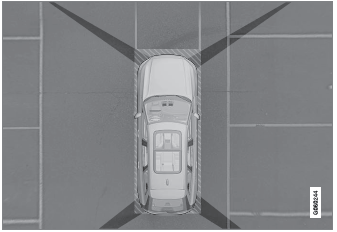
The location of the cameras and their approximate fields of vision.
