
Volvo XC90 2015-2026 Owners Manual / Climate control / Climate control system voice commands
Volvo XC90: Climate control / Climate control system voice commands
(Certain markets only)
Voice commands can be used for the climate control system to e.g. change temperature, activate seat heating* or change blower speed.
Tap  and say one of the following
commands:
and say one of the following
commands:
- "Climate" - starts a command dialog for climate controls and provides examples of commands that can be used.
- "Set temperature to X degrees" - sets desired temperature.
- "Raise temperature"/"Lower temperature" - raises/lowers the set temperature.
- "Sync temperature" - synchronizes the temperature for all climate zones in the vehicle with the temperature set for the driver's side.
- "Air on feet"/"Air on body" - opens the desired air vent.
- "Air on feet off"/"Air on body off" - closes the desired air vent.
- "Set fan to max"/"Turn off fan" - changes blower speed to Max/Off.
- "Raise fan speed"/"Lower fan speed" - raises/lowers the set blower speed.
- "Turn on auto" - activates automatic climate control.
- "Air condition on"/"Air condition off" - activates/deactivates air conditioning.
- "Recirculation on"/"Recirculation off" - activates/deactivates air recirculation.
- "Turn on defroster"/"Turn off defroster" - activates/deactivates window and door mirror defrosting.
- "Turn on max defroster"/"Turn off max defroster" - activates/deactivates max defroster.
- "Turn on rear defroster"/"Turn off rear defroster" - Activates/deactivates heated rear window and door mirrors.
- "Turn steering wheel heat on"/"Turn steering wheel heat off" - activates/deactivates heated steering wheel*.
- "Raise steering wheel heat"/"Lower steering wheel heat" - raises/lowers the level of steering wheel heating*.
- "Turn on seat heat"/"Turn off seat heat" - activates/deactivates seat heating*.
- "Raise seat heat"/"Lower seat heat" - raises/lowers the level of seat heating*.
- "Turn on seat ventilation"/"Turn off seat ventilation" - activates/deactivates seat ventilation*.
- "Raise seat ventilation"/"Lower seat ventilation" - raises/lowers the level of seat ventilation*.
NOTE
Not all system languages support voice control. If a language supports
voice control, it is marked with a
 symbol in the list of available
system languages. Read more about where the information is found in the section
on voice control settings.
symbol in the list of available
system languages. Read more about where the information is found in the section
on voice control settings.
* Option/accessory.
 Climate control sensors. Perceived temperature
The climate system has a number of sensors to help regulate the climate settings
in the vehicle. Do not cover or block the sensors with clothing or other objects...
 Air quality
(Option/accessory)
The materials used in the passenger compartment and air filtering system have
been selected to ensure a high level of air quality in the passenger compartment...
Other information:
Volvo XC90 2015-2026 Owners Manual: Eco drive mode
Eco drive mode can help make driving more fuel-efficient and eco-friendly. Use this mode to save fuel and promote ecofriendly driving. When Eco mode is activated, the following characteristics are modified: The automatic transmission's shifting points...
Volvo XC90 2015-2026 Owners Manual: Adjusting the door mirrors
To improve visibility to the rear, the door mirrors need to be adjusted to the driver's height and seating position. There are several automatic settings that can also be connected to the memory function buttons for the power seat*. Controls used for door mirrors Door mirror controls...
- Manuals Home
- 2nd Generation XC90 Owners Manual
- 2nd Generation XC90 Service Manual
- Video
- Activating and deactivating the head-up display
- Drive modes
- New on site
- Most important about car
Categories
Leveling control settings
(Option/accessory.)
Turn off leveling control before lifting the vehicle with a jack to help avoid problems with the pneumatic suspension.
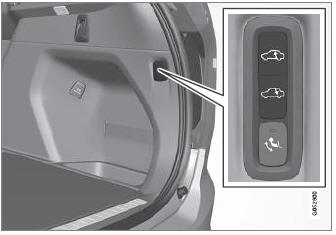
The vehicle can be lowered or raised to make it easier to load or for passengers to get in and out.
Adjusting loading mode

Copyright © 2026 www.voxc90.com