
Volvo XC90: Climate control / Air quality
(Option/accessory)
The materials used in the passenger compartment and air filtering system have been selected to ensure a high level of air quality in the passenger compartment.
Materials used in the passenger compartment
The materials in the passenger compartment are designed to be pleasant and comfortable, even for people with asthma or allergies.
The materials have been developed and tested to reduce dust in the passenger compartment and make it easier to keep clean.
The mats in both the passenger compartment and cargo compartment can be easily removed for cleaning.
Use Volvo-recommended cleaning agents and car care products to clean the interior.
Air filtering systems
In addition to the passenger compartment air filter, the vehicle is also equipped with other air cleaning systems that help you maintain high air quality in the passenger compartment.
 Climate control system voice commands
(Certain markets only)
Voice commands can be used for the climate control system to e.g. change temperature,
activate seat heating* or change blower speed...
 CleanZone
(Option/accessory)
The CleanZone function monitors the conditions affecting good air quality
in the passenger compartment and indicates whether they are fulfilled or not...
Other information:
Volvo XC90 2015-2026 Owners Manual: Adjusting the power * front seats
(Option/accessory) Set the desired seating position using the controls on the front seat cushion. To set the convenience functions, turn the multifunction control1 upward/downward. The illustration shows the controls in a vehicle with four-way lumbar support*...
Volvo XC90 2015-2026 Owners Manual: Selecting ignition mode
The vehicle's ignition can be put in various modes (levels) to make different functions available. Selecting an ignition mode Start knob in the tunnel console. Ignition mode 0 – Unlock the vehicle and keep the remote key in the passenger compartment...
- Manuals Home
- 2nd Generation XC90 Owners Manual
- 2nd Generation XC90 Service Manual
- Indicator and warning symbols
- Activating and deactivating the head-up display
- Front fog lights/corner illumination
- New on site
- Most important about car
Categories
Location and field of vision of Park Assist Cameras
The Park Assist Cameras (PAC1) can display a 360° panoramic view as well as separate views for each of the four cameras: rear, front, left and right.
360° view*
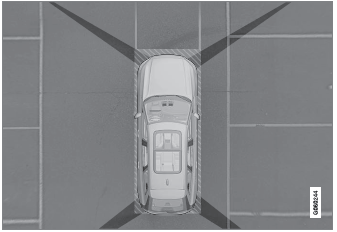
The location of the cameras and their approximate fields of vision.
