
Volvo XC90: Lighting / Pinch protection for windows and sun curtains
All power windows and sun curtains* have a pinch protection function that is triggered if anything blocks them while they are opening or closing.
If pinch protection is activated, movement will stop and then retract automatically to approx. 50 mm (2 inches) from the point at which it was blocked (or to full ventilation position).
It is still possible to override pinch protection when closing is interrupted (e.g. due to ice) by pressing and holding down the control in the same direction.
If there is any problem with the pinch protection, a rest procedure can be tested.
WARNING
If the starter battery is disconnected, the function for automatic opening and closing must be reset to function correctly. A reset is required in order for the pinch protection to work.
* Option/accessory.
 WINDOWS, GLASS AND MIRRORS
Windows, glass and mirrors
The vehicle is equipped with several different types of windows, glass and
mirrors. Some of the windows in the car are laminated...
 Reset procedure for pinch protection
If you experience any problems with the electrical functions for the power
windows, you can try to perform a reset.
WARNING
If the starter battery is disconnected, the function for automatic opening
and closing must be reset to function correctly...
Other information:
Volvo XC90 2015-2026 Owners Manual: Clean Zone Interior Package
(Option/accessory) Clean Zone Interior Package (CZIP) is a series of modifications that filters even more allergy and asthma-inducing substances and other pollutants from the passenger compartment. CZIP includes the following: An enhanced function that starts the blower when the vehicle is unlocked using the remote key...
Volvo XC90 2015-2026 Owners Manual: Infant seats
Suitable child restraints should always be used when children (depending on their age/size) are seated in the vehicle. Securing an infant seat with a seat belt Do not place the infant seat in the front passenger's seat Place the infant seat in the rear seat of the vehicle...
- Manuals Home
- 2nd Generation XC90 Owners Manual
- 2nd Generation XC90 Service Manual
- Using the windshield and head-light washers
- Resetting the trip odometer
- Adjusting front seat massage settings
- New on site
- Most important about car
Categories
Location and field of vision of Park Assist Cameras
The Park Assist Cameras (PAC1) can display a 360° panoramic view as well as separate views for each of the four cameras: rear, front, left and right.
360° view*
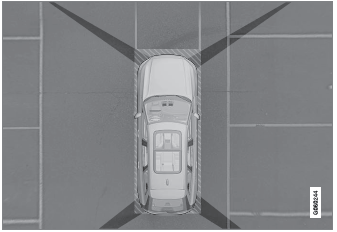
The location of the cameras and their approximate fields of vision.
