
Volvo XC90: Safety / Side airbags
The side airbags, on the driver's and passenger sides, protect the chest and hip in a collision.
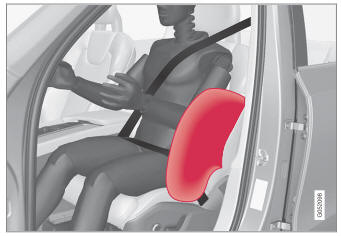
The side airbags are located in the front seats' outer backrest frames and help protect the driver and front seat passenger.
A collision of a sufficiently violent force will trigger the sensors and one or more side airbags will inflate. The side airbags inflate between the seat occupant and the door panel to help cushion the initial impact of the collision. The airbag deflates when compressed by the collision. The side airbags are normally only deployed on the side of the vehicle impacted by the collision.
WARNING
Volvo recommends contacting an authorized Volvo workshop for repairs. Incorrectly performed repairs to the side airbag system could impair function and lead to serious injury.
WARNING
Do not place any objects in the area between the outer edges of the seats and the door panels, as this could impair the function of the side airbags.
Volvo recommends only using seat covers approved by Volvo. Other seat covers could prevent the side airbags from functioning properly.
WARNING
The side airbag is a supplement to the seat belt. Always wear your seat belt.
 Occupant weight sensor
The Occupant Weight Sensor (OWS) is designed to meet the regulatory requirements
of Federal Motor Vehicle Safety Standard (FMVSS) 208 and is designed to disable
(will not inflate) the passenger's side front airbag under certain conditions...
 Inflatable curtain
The inflatable curtain, Inflatable Curtain (IC), helps to prevent the driver
and passengers from striking their heads on the inside of the vehicle during a collision...
Other information:
Volvo XC90 2015-2026 Owners Manual: Replacing the remote key's battery
The battery in the remote key must be replaced when it is discharged. NOTE All batteries have a limited service life and must eventually be replaced (does not apply for Key Tag). The battery's service life varies depending on how often the vehicle/key is used...
Volvo XC90 2015-2026 Owners Manual: Folding the third row backrests
(Option/accessory) The third row has two individual seats. These can be folded down separately. CAUTION To fold down the third-row seat backrests, it may be necessary to change the position/tilt the seats in the second row. Pull the handle on the upper side of the backrest upward/forward...
- Manuals Home
- 2nd Generation XC90 Owners Manual
- 2nd Generation XC90 Service Manual
- Resetting the trip odometer
- Folding the second row backrests
- Activating and deactivating the head-up display
- New on site
- Most important about car
Categories
Connecting equipment to the vehicle's data link connector
Incorrectly connected or installed software or diagnostic tools may have an adverse effect on the vehicle's electronics.
We strongly recommend that Volvo owners use only genuine, Volvo-approved accessories, and that accessory installations be performed only by a trained and qualified Volvo service technician. Certain accessories only work when the associated software is installed in the vehicle's computer system.
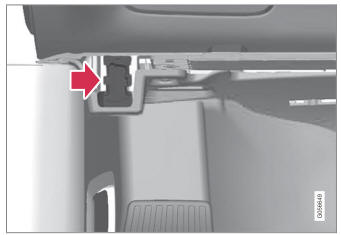
On-board Diagnostic (OBDII) socket under the dashboard on the driver's side.
