
Volvo XC90: Audio, media and internet / RBDS
RBDS radio
RBDS (Radio Broadcast Data System) enables certain functionality1, such as:
- Searches for program types or new broadcasts
- Text information about currently broadcast programs
1 Certain stations only.
 Radio settings
There are a number of different radio functions that can be activated and
deactivated.
Canceling a traffic message
A current broadcast (e.g. a traffic message) can be temporarily interrupted by
pressing in the right-side steering
wheel keypad or tapping Cancel in the center display...
 HD Radio™
HD Radio is a brand name registered by the DTS, Inc.1. They are the
developer of a broadcasting technology called IBOC or In Band On Channel, which
refers to the method of transmitting a digital radio broadcast signal centered on
the same frequency as the AM or FM station's present frequency...
Other information:
Volvo XC90 2015-2026 Owners Manual: Engine specifications
Engine specifications (output, etc.) for each engine variant are shown in the table below. The specifications for Special Edition vehicles may vary. NOTE Not all engines are available on all markets. A The engine code, component and manufacturer serial numbers can be found on the engine...
Volvo XC90 2015-2026 Owners Manual: Owner's Manual in the center display
A digital version of the Owner's Manual is available in the vehicle's center display 2. The digital Owner's Manual can be accessed from Top view and in certain cases, the contextual Owner's Manual can also be accessed from Top view. 2 Available in most markets...
- Manuals Home
- 2nd Generation XC90 Owners Manual
- 2nd Generation XC90 Service Manual
- Video
- Connecting a device via the USB port
- Front fog lights/corner illumination
- New on site
- Most important about car
Categories
Leveling control settings
(Option/accessory.)
Turn off leveling control before lifting the vehicle with a jack to help avoid problems with the pneumatic suspension.
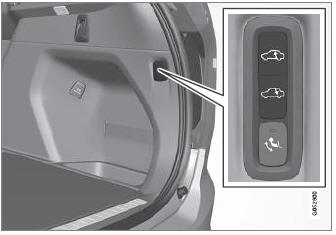
The vehicle can be lowered or raised to make it easier to load or for passengers to get in and out.
Adjusting loading mode

Copyright © 2026 www.voxc90.com