
Volvo XC90: Driver support / Steering assistance during collision risks from oncoming traffic
Steering assistance has several sub-functions. Steering assistance during collision risks from oncoming traffic can help a distracted driver who has not noticed that the vehicle is veering out of the lane.
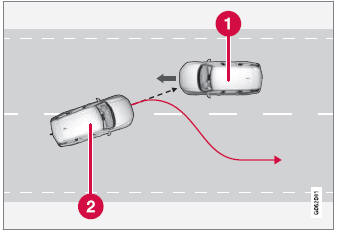
The function provides assistance by swerving your vehicle back into your own lane.
 Oncoming vehicles
 Own vehicle
When steering assistance is activated, collision warning for driver support will also be activated. However, the brake pedal pulsations that are part of collision warning will not be activated.
The function is active at speeds between 60-140 km/h (37-87 mph) on roads with clearly visible traffic lane markings/lines.
If your vehicle is starting to veer from your own lane and a vehicle is approaching from the opposite direction, this function can help the driver steer the vehicle back into its own lane.
However, the function will not provide steering assistance if the turn signal is used. The function will also not be activated if it detects that the driver is actively operating the vehicle.
 Run-Off Mitigation with steering assistance
Steering assistance has several sub-functions. Run-Off Mitigation with steering
assistance can help the driver and reduce the risk of the vehicle inadvertently
running off the road by actively steering the vehicle back onto the road...
 Steering assistance during collision risks from behind
(Option/accessory.)
Steering assistance has several sub-functions. If you become distracted and
do not notice your vehicle starting to veer out of the lane while another vehicle
is approaching from behind or is in your vehicle's blind spot, Steering assistance
during collision risks from behind can help provide assistance...
Other information:
Volvo XC90 2015-2026 Owners Manual: Changing waveband and radio station
Instructions for changing wavebands, waveband lists and radio stations in the selected list are provided here. Changing wavebands Swipe from App view on the center display and select the desired waveband (e.g. FM) or open the App menu in the instrument panel with the right-side steering wheel keypad and make your selection there...
Volvo XC90 2015-2026 Owners Manual: Getting into and out of the third row of seats
(Option/accessory) The second row of seats can be adjusted to make it easier to get in and out of the third row of seats*. The illustration is generic. To fold down the backrest: Pull the handle on the upper side of the right or left outboard second row seat upward/forward...
- Manuals Home
- 2nd Generation XC90 Owners Manual
- 2nd Generation XC90 Service Manual
- Moving the second row seats forward/rearward
- Filling washer fluid
- Indicator and warning symbols
- New on site
- Most important about car
Categories
Remote key
The remote key is used to lock and unlock doors, the tailgate and the fuel filler door. The remote key must be in the vehicle in order to start the engine.
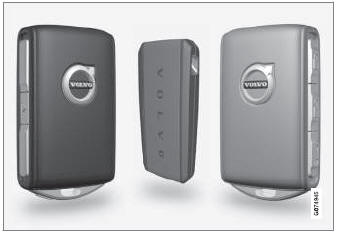
Remote key1, Care Key and button-less key (Key Tag)*.
