
Volvo XC90 2015-2026 Owners Manual / Creating and registering a Volvo ID / Terms and Conditions for Services
Volvo XC90: Creating and registering a Volvo ID / Terms and Conditions for Services
Volvo offers services that help enhance the vehicle's safety and comfort.
These services comprise everything from assistance in emergencies to navigation and various maintenance services.
Before using the services, it is important to read support information about terms and conditions for the services at volvocars.com.
 Data recording
As part of Volvo's commitment to safety and quality, certain information is
recorded regarding vehicle operation, functionality and incidents.
US market only:
EDR
This vehicle is equipped with an "Event Data Recorder" (EDR)...
 Customer Privacy Policy
Volvo respects and safeguards the personal privacy of everyone who visits
our websites.
This policy refers to the handling of customer data and personal information...
Other information:
Volvo XC90 2015-2026 Owners Manual: Owner's information
Owner's information is available in several different formats, both digital and printed. The Owner's Manual is available on the vehicle's center display, as a mobile app and on Volvo Cars' support website. There is also a Quick Guide in the glove compartment, as well as a supplement to the Owner's Manual containing information about e...
Volvo XC90 2015-2026 Owners Manual: Messages in the center display
The center display shows messages in certain circumstances to inform or assist the driver. Example of message in the center display's Top view. Messages with lower priority for the driver are shown in the center display. Most of the messages are shown in the center display's status bar...
- Manuals Home
- 2nd Generation XC90 Owners Manual
- 2nd Generation XC90 Service Manual
- Front fog lights/corner illumination
- Leveling control settings
- Eco drive mode
- New on site
- Most important about car
Categories
Location and field of vision of Park Assist Cameras
The Park Assist Cameras (PAC1) can display a 360° panoramic view as well as separate views for each of the four cameras: rear, front, left and right.
360° view*
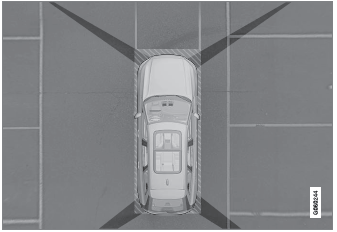
The location of the cameras and their approximate fields of vision.

Copyright © 2026 www.voxc90.com