
Volvo XC90 2015-2026 Owners Manual / Owner's information / The Owner's Manual and the environment
Volvo XC90: Owner's information / The Owner's Manual and the environment
The Owner's Manual is printed on paper from responsibly managed forests.
The Forest Stewardship Council (FSC)® symbol certifies that the paper pulp in the printed Owner's Manual comes from FSC®-certified forests or other responsibly managed sources.

Related information
- Drive-E ‒ purer driving pleasure
 Using the Owner's Manual
To get to know your new vehicle, read the Owner's Manual before driving it
for the first time.
Reading your Owner's Manual is a way to familiarize yourself with new features
and functions, get advice on how to handle your vehicle in different situations,
and to learn how to take advantage of everything your Volvo has to offer...
 Your Volvo
..
Other information:
Volvo XC90 2015-2026 Owners Manual: Driver Alert Control limitations
Driver Alert Control (DAC) functionality may be reduced in certain situations. In certain situations, the system may provide a warning even if it has not detected a change in driving behavior, e.g.: in strong crosswinds on grooved road surfaces. WARNING In certain cases, driving behavior might not be affected despite the driver's fatigue – when using the Pilot Assist* function – resultin..
Volvo XC90 2015-2026 Owners Manual: Climate system controls
The climate system functions are controlled from physical buttons on the center console, the center display, and the climate panel on the rear side of the tunnel console*. Physical buttons in the center console Button for max defroster. Button for heated rear window and door mirrors. Climate bar in the center display The most common climate system functions can be controlled from the climate..
- Manuals Home
- 2nd Generation XC90 Owners Manual
- 2nd Generation XC90 Service Manual
- Active high beam
- Adjusting front seat massage settings
- Connecting the vehicle to the Internet via vehicle modem (SIM card)
- New on site
- Most important about car
Categories
Location and field of vision of Park Assist Cameras
The Park Assist Cameras (PAC1) can display a 360° panoramic view as well as separate views for each of the four cameras: rear, front, left and right.
360° view*
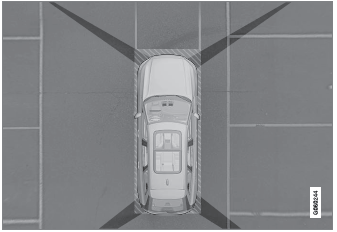
The location of the cameras and their approximate fields of vision.

Copyright © 2026 www.voxc90.com