
Volvo XC90: Starting and driving / Compass
(Option/accessory.)
An integrated compass1 in the upper right corner of the rearview mirror shows the direction the vehicle is traveling.
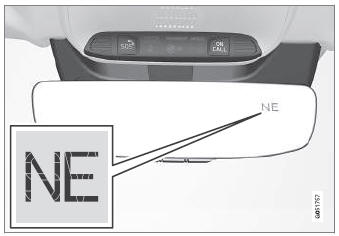
Rearview mirror with compass.
Eight different compass directions are shown with the abbreviations: N (north), NE (northeast), E (east), SE (southeast), S (south), SW (southwest), W (west) and NW (northwest).
1 Rearview mirror with compass is available as an option only on certain markets and models.
 Type approval for HomeLink®
(Option/accessory.) (Certain markets only.)
FCC (USA) and IC (Canada)
This device complies with FCC rules part 15 and Industry Canada RSS-210. Operation
is subject to the following two conditions: (1) This device may not cause harmful
interference, and (2) This device must accept any interference that may be received
including interference that may cause undesired operation...
 Activating and deactivating the compass. Calibrating the compass
Activating and deactivating
An integrated compass1 in the upper right corner of the rearview
mirror shows the direction the vehicle is traveling.
The compass is automatically activated when the vehicle is started...
Other information:
Volvo XC90 2015-2026 Owners Manual: Activating and deactivating Eco drive mode using the function button
There is a function button for Eco drive mode in the center display's Function view if the vehicle is not equipped with a drive mode control in the tunnel console. When the engine is switched off, Eco mode is deactivated and must therefore be reactivated each time the engine is started...
Volvo XC90 2015-2026 Owners Manual: App menu in instrument panel
The App menu in the instrument panel provides quick access to commonly used functions for certain apps. The illustration is generic. The App menu in the instrument panel can be used instead of the center display and is then controlled using the right-side steering wheel keypad...
- Manuals Home
- 2nd Generation XC90 Owners Manual
- 2nd Generation XC90 Service Manual
- Jump starting using another battery
- Indicator and warning symbols
- Activating and deactivating child locks
- New on site
- Most important about car
Categories
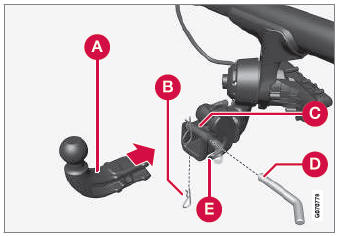
Detachable towbar
(Option/accessory.)
Volvo recommends the use of Volvo towbars that are specially designed for the vehicle.
NOTE
The optional detachable trailer hitch may not be available in all markets or on all models. Consult your Volvo retailer.

Copyright © 2026 www.voxc90.com