
Volvo XC90 2015-2026 Owners Manual / Your Volvo
Volvo XC90: Your Volvo
 The Owner's Manual and the environment
The Owner's Manual is printed on paper from responsibly managed forests.
The Forest Stewardship Council (FSC)® symbol certifies that the paper pulp in
the printed Owner's Manual comes from FSC®-certified forests or other responsibly
managed sources...
 Contacting Volvo
Use the following contact information if you would like to get in touch with
Volvo in the United States or Canada.
In the USA:
Volvo Car USA, LLC
Customer Care Center
1 Volvo Drive,
P...
Other information:
Volvo XC90 2015-2026 Owners Manual: Resetting the electric seat belt tensioners
The electric seat belt tensioners are designed to be reset automatically, but if the seat belt remains taut it can be reset manually. Stop the vehicle in a safe location. Unbuckle the seat belt and then rebuckle it. The seat belt and the electric seat belt tensioner will be reset...
Volvo XC90 2015-2026 Owners Manual: Locking and unlocking
The vehicle can be locked and unlocked in several different ways. The vehicle can be locked and unlocked using the buttons on the remote key with the detachable key blade (if the battery in the remote key is discharged) keyless* (Passive Entry), the remote key must be within range from inside the vehicle using the lock controls in the doors remote door unlocking with Volvo On Call...
- Manuals Home
- 2nd Generation XC90 Owners Manual
- 2nd Generation XC90 Service Manual
- Checking and filling engine oil
- Active high beam
- Activating and deactivating child locks
- New on site
- Most important about car
Categories
Distance Alert
(Option/accessory.)
The Distance Alert function can help the driver become aware if the time interval to the vehicle in front is too short. The vehicle must be equipped with a head-up display* in order to display Distance Alert.
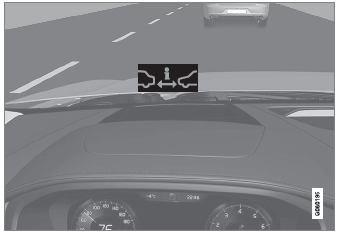
Symbol for Distance Alert on the windshield with head-up display

Copyright © 2026 www.voxc90.com