Volvo XC90: Your Volvo / Volvo ID
Volvo ID is a personal ID that gives you access to a range of services using a single username and password.
NOTE
The available services can vary over time and depend on equipment level and mar- ket.
Examples of services:
- Volvo On Call-app - check your vehicle using your phone. You can check fuel level, find the nearest gas station and lock the vehicle remotely.
- Send to Car – send addresses from online map services directly to the vehicle.
- Send a request for service and repairs directly from the vehicle. The booking will then be completed via email.
NOTE
If the username/password for a service (e.g. Volvo On Call) is changed, the change will also automatically be applied to other services.
The creation of a Volvo ID is initiated through the Volvo On Call app or from the vehicle and then completed by email.
When a Volvo ID is registered in the vehicle, additional services are available. Multiple Volvo IDs can be used for the same vehicle, and multiple vehicles can be linked to the same Volvo ID.
Related information
- Creating and registering a Volvo ID
- Scheduling service and repairs
 Contacting Volvo
Use the following contact information if you would like to get in touch with
Volvo in the United States or Canada.
In the USA:
Volvo Car USA, LLC
Customer Care Center
1 Volvo Drive,
P...
 Creating and registering a Volvo ID
A Volvo ID can be created in two ways. If your Volvo ID was created with the
Volvo On Call app, the Volvo IDmust also be registered to the vehicle to enable
access to the Volvo ID services...
Other information:
Volvo XC90 2015-2026 Owners Manual: Radio settings
There are a number of different radio functions that can be activated and deactivated. Canceling a traffic message A current broadcast (e.g. a traffic message) can be temporarily interrupted by pressing in the right-side steering wheel keypad or tapping Cancel in the center display...
Volvo XC90 2015-2026 Owners Manual: Automatic transmission
Gear position is selected automatically to make driving as energy efficient as possible. The transmission also has a manual mode. The transmission is available in two different versions. The gear selector indicates which transmission the vehicle has...
- Manuals Home
- 2nd Generation XC90 Owners Manual
- 2nd Generation XC90 Service Manual
- Eco drive mode
- Moving the second row seats forward/rearward
- Drive modes
- New on site
- Most important about car
Categories
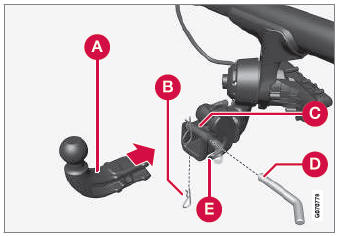
Detachable towbar
(Option/accessory.)
Volvo recommends the use of Volvo towbars that are specially designed for the vehicle.
NOTE
The optional detachable trailer hitch may not be available in all markets or on all models. Consult your Volvo retailer.