
Volvo XC90: Driver support / City Safety in crossing traffic
City Safety1 can assist the driver when turning into the path of an oncoming vehicle in an intersection.
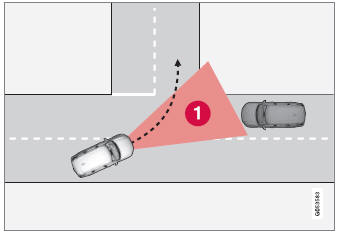
 Sector in which City Safety can
detect an oncoming vehicle in crossing traffic.
Sector in which City Safety can
detect an oncoming vehicle in crossing traffic.
In order for City Safety to detect an oncoming vehicle in situations where there is a risk of a collision, that vehicle must be within the sector in which City Safety can analyze the situation.
The following criteria must also be met:
- your vehicle's speed must be at least 4 km/h (3 mph)
- your vehicle must be making a left turn
- the oncoming vehicle's headlights must be on
1 This function is not available on all markets.
 Detecting obstacles with City Safety
City Safety1 can help the driver detect other vehicles, cyclists,
large animals and pedestrians.
Vehicles
City Safety can detect most vehicles that are stationary or are moving in the
same direction as your vehicle...
 Limitations of City Safety in crossing traffic
In certain situations, it may be difficult for City Safety to help the driver
avoid a collision with crossing traffic.
For example:
On slippery roads when Electronic Stability Control (ESC) is actively operating...
Other information:
Volvo XC90 2015-2026 Owners Manual: Protecting a driver profile
It may not always be desirable to store settings made in the vehicle to the active driver profile. In these instances, the driver profile can be protected. NOTE Protecting a driver profile is only possible when the vehicle is stationary. To protect a driver profile: Tap Settings in the Top view in the center display...
Volvo XC90 2015-2026 Owners Manual: Using Apple® CarPlay®
(Option/accessory.) To use CarPlay1, the Siri voice control must be activated in your iOS device. The device must also have an Internet connection via Wi- Fi or a mobile network for all functions to work. Connecting an iOS device and starting CarPlay NOTE CarPlay can only be used if Bluetooth is disabled...
- Manuals Home
- 2nd Generation XC90 Owners Manual
- 2nd Generation XC90 Service Manual
- Video
- Jump starting using another battery
- Moving the second row seats forward/rearward
- New on site
- Most important about car
Categories
Distance Alert
(Option/accessory.)
The Distance Alert function can help the driver become aware if the time interval to the vehicle in front is too short. The vehicle must be equipped with a head-up display* in order to display Distance Alert.
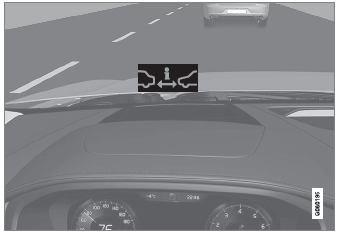
Symbol for Distance Alert on the windshield with head-up display
