
Volvo XC90 2015-2026 Owners Manual / Specifications / Transmission fluid specifications
Volvo XC90: Specifications / Transmission fluid specifications
Under normal driving conditions, the transmission fluid will not need to be changed during the transmission's service life. However, it may need to be changed if the vehicle is driven frequently in adverse driving conditions.

 Engine oil specifications
Engine oil of type VCC RBS0-2AE 0W-20 must be used. Lower oil grades may not
offer the same fuel economy, engine performance or engine protection.
Volvo recommends:
General
See the Service and warranty booklet for information about oil change intervals...
 Brake fluid specifications
The medium in the hydraulic brake system is called brake fluid and is used
to transfer pressure from e.g. a brake pedal via a master brake cylinder, which
in turn actuates the brake calipers...
Other information:
Volvo XC90 2015-2026 Owners Manual: Protecting a driver profile
It may not always be desirable to store settings made in the vehicle to the active driver profile. In these instances, the driver profile can be protected. NOTE Protecting a driver profile is only possible when the vehicle is stationary. To protect a driver profile: Tap Settings in the Top view in the center display...
Volvo XC90 2015-2026 Owners Manual: Adjusting the rearview mirror dimming function
Bright light entering the vehicle from behind, e.g. from the headlights of following vehicles, could reflect in the rearview mirror and door mirrors and cause a glare. Use the dimming function when light from behind is distracting. Auto-dim If bright light enters the vehicle from behind, the door mirrors will automatically dim when it is dark outside or when lighting conditions are low, for exa..
- Manuals Home
- 2nd Generation XC90 Owners Manual
- 2nd Generation XC90 Service Manual
- Activating and deactivating the head-up display
- Indicator and warning symbols
- Filling washer fluid
- New on site
- Most important about car
Categories
Apps
The App view contains apps that provide access to certain vehicle services.
Swipe the center display screen from right to left1 to access the App view from the Home view. This view displays downloaded apps (third-party apps) as well as apps for integrated functions, such as FM radio.
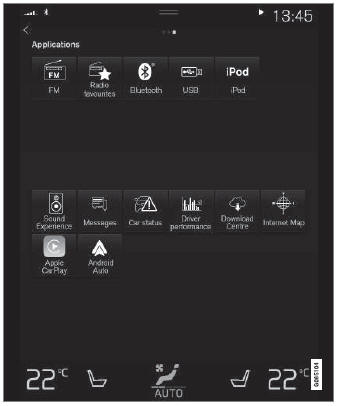
App view. (generic illustration; basic apps vary depending on market and model)

Copyright © 2026 www.voxc90.com